How to Handle .env Credentials in GitHub Actions When .gitignore Excludes Them
A step-by-step guide to storing sensitive environment variables safely in GitHub Secrets and dynamically populating .env files during CI/CD test execution.
The Problem: `.env` Is Ignored in Git
When developing locally, test frameworks (like Cypress, Playwright, Selenium, or Node/Python projects) read sensitive configuration—like passwords, database keys, and API tokens—from a local .env file:
# Local .env file (DO NOT COMMIT THIS)
BASE_URL=https://staging.example.com
DB_USER=admin
DB_PASSWORD=SuperSecretPassword123!
API_KEY=xyz987654321
Because commiting sensitive credentials to public or private Git repositories poses a severe security risk, the .env file is listed inside .gitignore. However, when your GitHub Actions CI pipeline runs on a cloud server, the pipeline fails because the `.env` file does not exist!
Step 1: Verify `.gitignore` Excludes Your Local `.env` File
First, ensure your secret environment file is safely ignored locally so it never gets committed to your repository code.
Check or edit your local project's .gitignore file:
# .gitignore
node_modules/
.env
.env.local
*.log
Step 2: Add Credentials to GitHub Secrets
Store your sensitive credentials safely inside GitHub's encrypted secret store.
- Navigate to your project repository on GitHub.com.
- Click on Settings tab in the top navigation.
- In the left sidebar, click Secrets and variables > Actions.
- Click the green button: New repository secret.
- Add each environment key-value pair separately:
- Name:
BASE_URL| Value:https://staging.example.com - Name:
DB_PASSWORD| Value:SuperSecretPassword123!
- Name:
- Click Add secret.
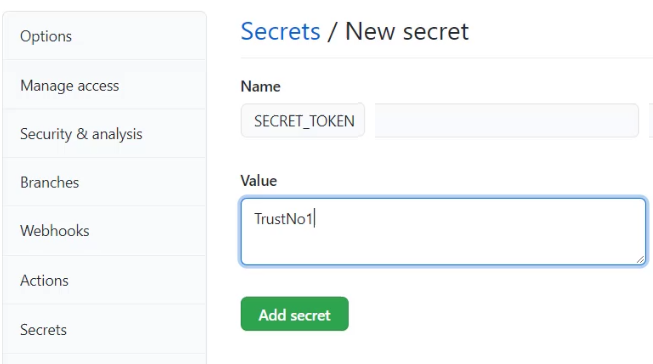
Figure 1: Adding repository secret credentials in GitHub Settings.

Figure 2: Stored repository secrets list on GitHub Actions dashboard.
Step 3: Option A — Pass Secrets Directly as Environment Variables
If your framework reads environment variables directly from the process environment (e.g., process.env.DB_PASSWORD or os.environ['DB_PASSWORD']), pass GitHub secrets in your workflow steps under the env: key:
name: Run Tests with GitHub Secrets

on: [ push ]

jobs:
  test:
    runs-on: ubuntu-latest
    steps:
      - uses: actions/checkout@v4

      - name: Setup Node.js
        uses: actions/setup-node@v4
        with:
          node-version: '20'

      - name: Install Dependencies
        run: npm ci

      - name: Run Automation Tests
        run: npm test
        # Map GitHub Secrets directly into step runner environment
        env:
          BASE_URL: ${{ secrets.BASE_URL }}
          DB_PASSWORD: ${{ secrets.DB_PASSWORD }}
Step 4: Option B — Dynamically Create `.env` File in Pipeline Runner
If your framework specifically requires a physical .env file on disk (e.g., using dotenv packages), create one dynamically on the virtual machine runner before running your test suite.
Example YAML Step to Create `.env` on the Fly:
name: CI Pipeline with Dynamic .env Creation

on: [ push ]

jobs:
  build-and-test:
    runs-on: ubuntu-latest

    steps:
      - name: Checkout Repository
        uses: actions/checkout@v4

      # STEP TO CREATE DYNAMIC .ENV FILE
      - name: Create .env file from GitHub Secrets
        run: |
          echo "BASE_URL=${{ secrets.BASE_URL }}" >> .env
          echo "DB_USER=${{ secrets.DB_USER }}" >> .env
          echo "DB_PASSWORD=${{ secrets.DB_PASSWORD }}" >> .env
          echo "API_KEY=${{ secrets.API_KEY }}" >> .env

      - name: Run Tests Reading .env File
run: npm testecho "KEY=VALUE" >> .env generates a brand-new .env file inside the GitHub Actions virtual runner workspace during runtime. Once the workflow finishes, the temporary VM and file are completely destroyed.
Summary Comparison
| Environment | Where Credentials Live | How They Are Read |
|---|---|---|
| Local Machine | Local .env file (Ignored by Git) |
Framework reads .env using packages like dotenv |
| GitHub Repository | GitHub Repository Secrets Store | Encrypted in GitHub Settings database |
| GitHub Actions Runner | Passed via env: or dynamically written to .env |
Accessed via ${{ secrets.SECRET_NAME }} |



No comments:
Post a Comment